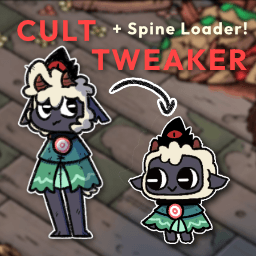
Custom player spines
A custom player spine replaces the Lamb's skeleton with one of your own. Spines
live in BepInEx/plugins/CultTweaker/PlayerSkins, one folder per skeleton.
Exporting a usable Spine skin
- Export the Spine skin via Spine 3.8.99.
- Export as a JSON file.
- Output:
Nonessential data: TRUE,Animation cleanup: TRUE,Warnings: TRUE. - Texture atlas:
Pack TRUEwith the default pack settings. - If any warnings occur it may be best to fix them, or the skin may not load into the game.
Folder layout
In the PlayerSkins folder, create a new folder for each individual spine you
want to load. The folder is named after your skin - this example uses
DEBUGSKIN. In it, place:
- a
.jsonfile, your exported Spine skeleton - an
.atlasfile, your exported Spine atlas - any number of
.pngfiles packed with it - a
config.jsonwith the settings below
A complete skin folder looks like this:
| CustomSpineLoader.dll
| PlayerSkins
    | DEBUGSKIN
        | player-main.json
        | player-main.png
        | player-main.atlas
        | config.json
config.json
Each spine folder must have a config.json:
{
    "defaultSkin": "CustomSkinName",
    "skins": [
        "CustomSkinName",
        "CustomSkinName2"
    ]
}
defaultSkin will be the first skin that is loaded when the game starts.
skins is an array of any number of strings naming the skins that exist in your
Spine skeleton and that you want loaded into the game.
Optional settings
{
    "defaultSkin": "A_Tiger",
    "skins": [ "A_Tiger" ],
    "disableFleeceCycling": true,
    "hiddenSlots": [
        "CROWN",
        "CROWN_EYE",
        "images/PonchoLeft",
        "images/PonchoRight"
    ]
}
| Field | Type | Default | Description |
|---|---|---|---|
defaultSkin | string | — | The first skin loaded when the game starts. |
skins | string array | — | The skins in your skeleton to load into the game. |
disableFleeceCycling | bool | false | Stops fleece transmog from dressing this spine. |
hiddenSlots | string array | empty | Slot names this spine never draws. |
preloadWeapons | bool | false | Loads this spine at boot so its custom weapons never show the base look while loading. See custom weapons. |
weapons | array | — | Custom weapons declared by this spine. See custom weapons. |
disableFleeceCycling stops fleece transmog from dressing this spine. The fleece writes to the body, the poncho, the rope and the bell, so on a skin that draws its own body the lamb's artwork replaces yours. The fleece picker keeps working and keeps remembering your choice - it simply is not applied while this spine is worn, and comes back when you swap to one that allows it.
hiddenSlots is a list of slot names this spine never draws. Use it for parts
of the lamb rig your art replaces, such as the crown. Hiding a slot in the
Spine editor does not export, and clearing its setup attachment only lasts
until the first animation that keys the slot - the lamb skeleton keys CROWN in
276 animations and PonchoLeft in 181, and the game re-attaches the crown by
name whenever it flies back or you change room. Listing the slot here replaces
its artwork with fully transparent copies in the skin that all of those resolve
through, so it stays hidden however it is re-attached. The attachments are
replaced rather than deleted because some are required to exist: the game throws
Attachment not found: CROWN if the crown cannot be resolved by name.
Both settings apply per player and only while that spine is worn; other skins in the same file, and the vanilla lamb, are untouched.
Fleece transmog and cycling
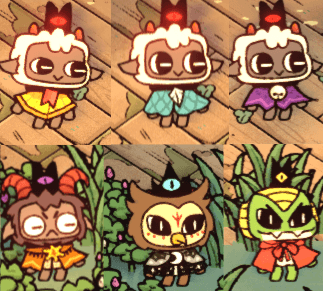
Fleece transmog swaps the visual fleece on any player skin, custom spines
included, at any time and anywhere. It is controlled from the F7 CultTweaker
panel, which keeps a transmog toggle per player, and by the [Fleece] section of
the config file:
FleeceCyclingEnabledturns fleece cycling on or off for all players.FleeceTransmogP1,FleeceTransmogP2and so on hold the per-player switch.CurrentFleeceIndexP1/CurrentFleeceNameP1(and the P2 pair) remember the chosen fleece between sessions, the name kept alongside the index so its spine can load at boot.
A spine with disableFleeceCycling still hides its hiddenSlots; it is only the
fleece artwork that is skipped.
Per-player spines in co-op
The player spine loader supports co-op with a separate spine per player. The
chosen spine for each player is kept in the [Spine] config section as
SelectedSpineP1 and SelectedSpineP2, and the F7 panel has a player dock with
a moving character preview and a preview animation dropdown for picking them.
Player spines load in at startup rather than the first time the base is entered, so a custom lamb skin can be used in the intro.
Custom player spines also show on the player tab of the inventory, in Knucklebones and in Flockade, for both players and on the Flockade result card.
Known issue
Worldshaper
CultTweaker's in-game editor - tools, layers, groups, triggers, dungeons, hubs, base editing, world maps, the menu editor and co-editing over Steam.
Follower forms
Build follower forms from single sprites - slot overrides, placement, colour sets, the F8 live editor, and migrating from JSONLoader.