Custom structures
Structures live in BepInEx > plugins > CultTweaker > CustomStructures, one
folder each, with a config.json.
A sprite structure
{
  "StructureName": "Custom Altar",
  "StructureDescription": "A custom altar for your cult.",
  "SpritePath": "icon.png",
  "BuildDurationMinutes": 60,
  "BuildOnlyOne": true,
  "RequiresTempleToBuild": true,
  "CanBeFlipped": false,
  "HideFromBuildMenu": false,
  "Bounds": { "X": 2, "Y": 2 },
  "ItemCost": { "LOG": 20, "STONE": 10 }
}
The shipped template, Templates/CustomStructures/ExampleStructure, is the same
config with an Overrides array:
{
  "StructureName": "Custom Altar",
  "StructureDescription": "A custom altar for your cult.",
  "SpritePath": "custom_altar.png",
  "Overrides": [],

  "BuildDurationMinutes": 60,

  "BuildOnlyOne": true,

  "RequiresTempleToBuild": true,

  "CanBeFlipped": false,

  "HideFromBuildMenu": false,
  "Bounds": { "X": 2, "Y": 2 },

  "ItemCost": { "LOG": 20, "STONE": 10 }
}
Fields
| Field | Type | Description |
|---|---|---|
StructureName | string | The name the structure is listed and built under. |
StructureDescription | string | The description shown in the build menu. |
SpritePath | string | A PNG in the same folder. For a sprite structure this is the structure; for a Spine structure it is only the build menu icon. |
Overrides | array | Sprite overrides, in the same shape as a building override. |
BuildDurationMinutes | number | How long the structure takes to build. |
BuildOnlyOne | bool | Whether only one may exist in the settlement. |
RequiresTempleToBuild | bool | Whether a temple is needed before it can be built. |
CanBeFlipped | bool | Whether the structure can be mirrored when placed. |
HideFromBuildMenu | bool | Keeps the structure out of the player's build menu. |
Bounds | { X, Y } | The footprint in tiles. |
ItemCost | object | Item name to quantity, the cost to build it. |
Spine | object | Builds the structure as an animated skeleton instead of a flat sprite. See below. |
Set HideFromBuildMenu to true to keep a structure out of the player's build
menu while still being able to place it yourself in the map editor. This is
useful for scenery that belongs to a map rather than to a cult.
Custom structures also gain the editor's structure extras: an Affected by wind checkbox so they sway with the biome's own wind, shadows, and see-through when they block the camera during editing.
Building a Spine structure instead of a sprite
Add a Spine block and drop the Spine export (.json skeleton, .atlas, .png
pages) into the same folder. The structure is then built as an animated skeleton
rather than a flat sprite:
  "Spine": {
    "SkinName": "Marble",
    "Animation": "idle",
    "Loop": true,
    "Offset": { "X": 0, "Y": 0, "Z": 0 },
    "Scale": { "X": 1, "Y": 1, "Z": 1 }
  }
The shipped Templates/CustomStructures/ExampleSpineStructure is a complete
example:
{
  "StructureName": "Occultist Effigy",
  "StructureDescription": "A scamp of the Old Faith, knelt in endless prayer. It does not look up when you pass.",
  "SpritePath": "icon.png",
  "Overrides": [],

  "BuildDurationMinutes": 45,
  "BuildOnlyOne": false,
  "RequiresTempleToBuild": true,
  "CanBeFlipped": true,
  "Bounds": { "X": 1, "Y": 1 },

  "ItemCost": { "LOG": 15, "STONE": 5 },

  "Spine": {
    "SkinName": "SF_Occultist_Scamp",
    "Animation": "_idles/pray",
    "Loop": true,

    "SkeletonScale": 0.005,
    "Offset": { "X": 0, "Y": 0, "Z": 0 },
    "Scale": { "X": 1, "Y": 1, "Z": 1 },
    "HideSprite": true
  }
}
Spine block fields
Every field is optional.
| Field | Type | Default | Description |
|---|---|---|---|
SkinName | string | the skeleton's default skin | Which skin to dress the structure in. |
Animation | string | none | Which animation to play once placed. Empty holds the setup pose, which is what a static prop wants. |
Loop | bool | true | Whether that animation loops. |
Offset | { X, Y, Z } | zero | Nudges the skeleton relative to the structure's tile. |
Scale | { X, Y, Z } | one | Scales the skeleton relative to the structure's tile. |
Rotation | { X, Y, Z } | matches the structure's sprite | The world is drawn on a tilt, so anything standing upright in it is rotated -60 on X (300 in the inspector). Left out, the skeleton copies whatever the structure's own sprite does, falling back to that tilt. Set it to { "X": 0, "Y": 0, "Z": 0 } for a prop meant to lie flat on the ground. |
SkeletonScale | float | 0.005 | Spine's import scale, for art authored at a different unit size. 0.005 matches the game's own skeletons. |
SkeletonPath, AtlasPath, TexturePaths | string / array | auto-discovered | Set these only when the folder holds more than one export. |
ShaderName | string | Spine/Skeleton | The material shader used for the skeleton. |
HideSprite | bool | true | Hides the flat sprite underneath. Set false to keep a painted base under an animated skeleton. |
Auto-discovery
Nothing needs to be named in the Spine block because everything is discovered
from the folder:
- the skeleton is the one
.jsonthat is notconfig.json - the atlas is the one
.atlas - the pages are every
.pngexcept the oneSpritePathclaims as the icon
Set SkeletonPath / AtlasPath / TexturePaths only if a folder holds more
than one set.
SpritePath is still used as the build menu icon, so keep a sprite for it.
The icon PNG is deliberately excluded from atlas page discovery - without that
exclusion it would be loaded as an atlas page and the skeleton would render
blank. Without an icon the structure falls back to a placeholder and still builds
as the skeleton.A skin or animation name the skeleton does not have is a warning in the log, not a crash: the structure falls back to the default skin and the setup pose.
Log lines to look for
Found custom structure folder: ...
Structure '...': spine attached
The first appears at startup, the second the first time the structure is placed.
ExampleSpineStructure is an occultist scamp knelt in prayer,
written against the same Spine export the CustomNpcs/TestNpc sample uses - the
Human.json / Human.atlas / Human.png / Human2.png export - so copying
those four art files in beside it makes it work as-is.Overriding the game's own structures
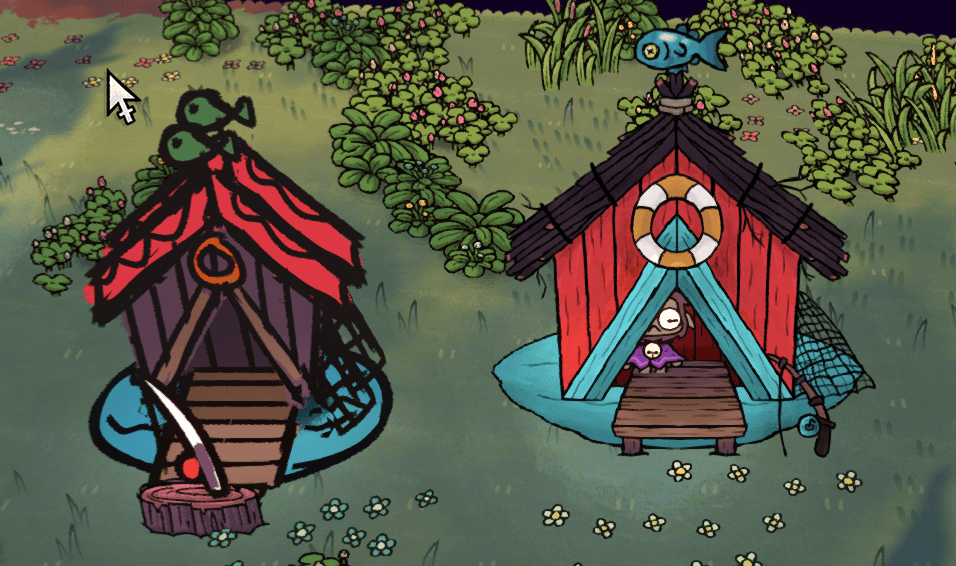
Create a folder named after the structure you want to override in the
BuildingOverrides folder. Add images and a config.json.
A complete structure skin folder looks something like this:
| CultTweaker.dll
| BuildingOverrides
    | FISHING_HUT
        | fishing_hut_BACK.png
        | fishing_hut_FRONT.png
        | config.json
Each structure override folder must have a config.json in it:
{
    "overrides": [
        {
            "spriteImageName": "fishing_hut_BACK.png",
            "offset": { "x": 0, "y": 0, "z": 0 },
            "scale": { "x": 1, "y": 1, "z": 1 },
            "rotation": { "x": 0, "y": 0, "z": 0 }
        },
        {
            "spriteImageName": "fishing_hut_FRONT.png",
            "offset": { "x": 0, "y": 0, "z": 0 },
            "scale": { "x": 1, "y": 1, "z": 1 },
            "rotation": { "x": 0, "y": 0, "z": 0 }
        },
    ]
}
| Field | Type | Description |
|---|---|---|
spriteImageName | string | A PNG in the same folder. |
offset | { x, y, z } | Where the sprite sits relative to the structure. |
scale | { x, y, z } | How large it is drawn. |
rotation | { x, y, z } | How it is oriented in the world. |
Change your offset and rotation accordingly, so as to build your structure design. A few things to note when building a custom structure design:
- When sprites are rendered at rotation
0,0,0the sprite is placed flat against the ground. - An offset Z of at least
-0.027should be applied to flat sprites to remove z-fighting. To place other sprites above that one, go more negative, such as-0.04. - If the sprites should be facing the camera, a rotation of
300,0,0is necessary.